¶ ⭐ Vote Signs / Leaderboard Signs
This page explains how to create VotingPlugin leaderboard signs, place heads, set skulls, and configure the 3×3 update area.
¶ 🪧 Adding a Sign

To create a leaderboard sign:
Line 1: [VotingPlugin]
Line 2: Position
Line 3: All / Monthly / Weekly / Daily
The appearance and text for signs are controlled by VotingPlugin’s internal formatting system and configurable sign settings.
¶ 🎥 Setup Video
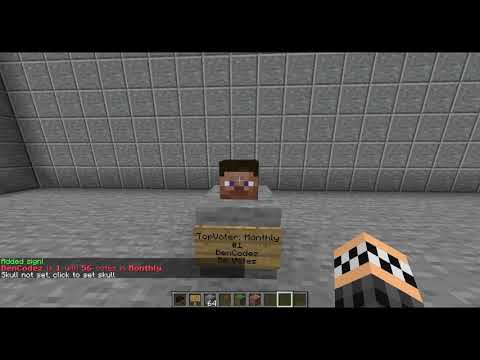
¶ 🔄 How Updating Works
- Signs update in a 3×3 area around the sign.
- If you set a skull (right-click the sign, then click a skull block), the update location will follow that skull.
- This allows you to customize exactly where heads appear.
¶ 👤 Heads

VotingPlugin automatically places player heads to match leaderboard positions (1st, 2nd, 3rd, etc.).
¶ 🔳 3×3 Cube of Heads
(Center of cube is the sign unless a skull is set)

- The default maximum head layout is a 3×3 cube centered on the sign.
- Setting a skull overrides the center point.
¶ ☠️ Setting a Skull

To manually set a skull anchor point:
- Right-click the sign
- Then click the skull block
This binds the sign to that skull and forces updates to occur at that exact location.
¶ 📦 Setup Example

¶ 🔢 Important
Signs should be placed in order (1 → 5).
If not placed sequentially, the heads may not update correctly.